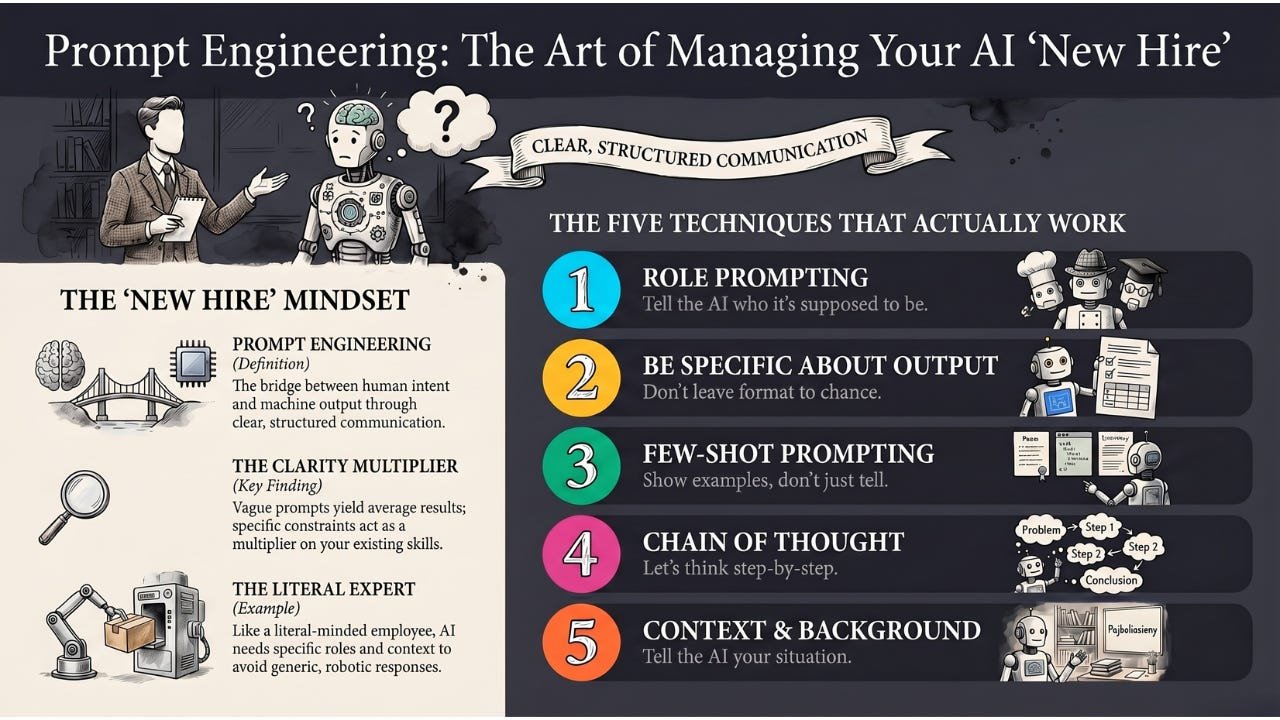
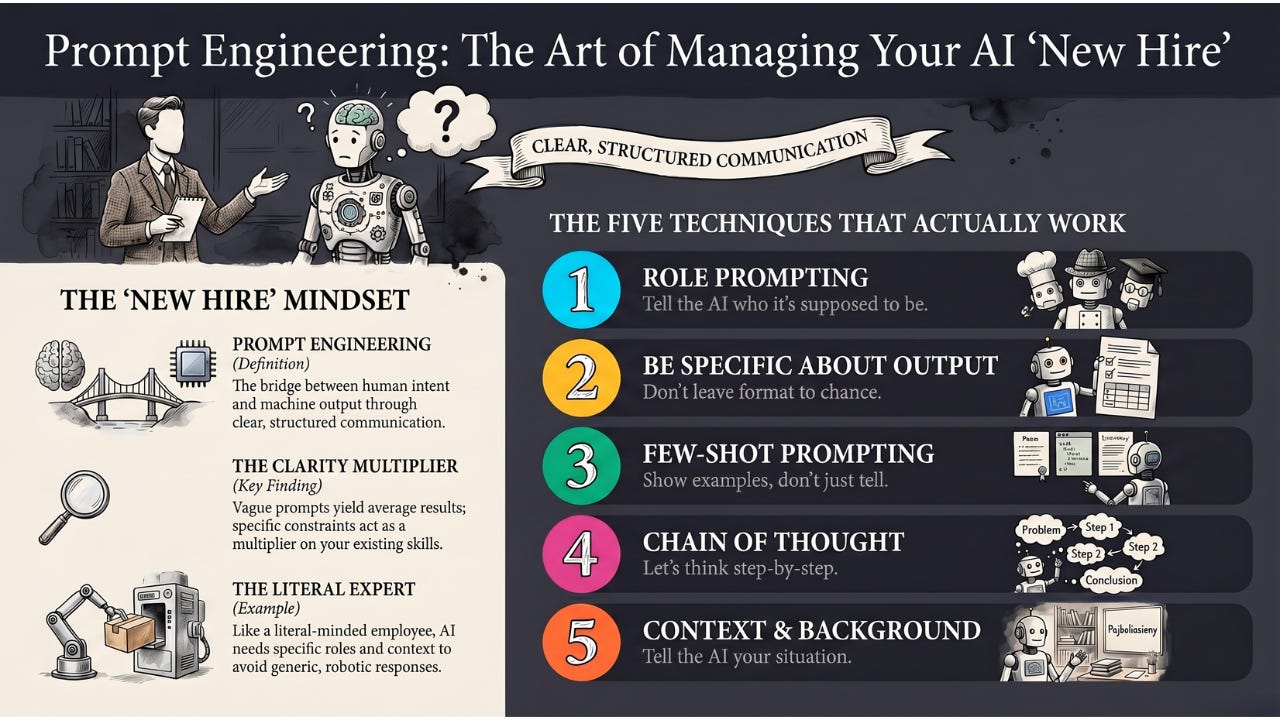
Prompt Engineering is the skill of crafting inputs to guide AI models toward the specific output you want — less about coding, more about clear communication with machines.
Hey Common Folks!
In our last article, we covered what a prompt is — the bridge between human intent and machine output. Before that, we met the Large Language Model — the engine inside ChatGPT, Claude, and Gemini — and a few articles back we built up to it through Neural Networks.
You now know what a prompt is. This article is about the part that actually changes your results: how to write a good one.
Have you ever asked ChatGPT a question, gotten a generic, unhelpful answer, then rephrased it and suddenly gotten something brilliant? That’s not luck. That’s the difference between a bad prompt and a good one.
The skill of crafting better prompts has a name: Prompt Engineering.
Why “Engineering”?
Don’t let the word scare you. This isn’t about writing code or building bridges.
Prompt Engineering is about communication skills — talking to a machine in a way it understands best. It’s the art of being specific, structured, and strategic with your instructions.
The Analogy: Back to Our New Hire
Remember the new hire we’ve been working with? The one who read the entire internet before day one?
They have all the knowledge in the world. But they are extremely literal and have zero context about your specific life or business.
Bad Manager (You):
“Write an email to the client.”
The new hire (The AI):
Panic. Which client? Good news or bad? Formal or casual? They guess and write something generic and robotic.
Prompt Engineer (You):
“Act as a senior sales manager. Write a polite but firm email to ‘Client X’ regarding their overdue payment of $500. Keep it under 100 words. Don’t use emojis.”
The new hire (The AI):
Understood. They write exactly what you need because you gave them the Role, the Context, and the Constraints.
Prompt Engineering is just being a really good manager to your AI new hire.
Why Does This Work? (The Technical Bit)
Remember how LLMs work? They predict the next word based on patterns they’ve seen.
When you write a detailed prompt, you’re filling the AI’s Context Window with specific patterns. The AI looks at those patterns and generates text that fits that specific context.
When you go a step further and include examples of the input-output pattern you want, you’re using something researchers call In-Context Learning — the AI picks up the pattern from the examples in your prompt without any retraining. We’ll see this in action in technique #3.
Vague stage = vague performance.
Specific stage = specific performance.
The Five Techniques That Actually Work
You don’t need a degree for this. Master these five approaches.
1. Role Prompting (The “Act As” Hack)
Tell the AI who it’s supposed to be.
-
Instead of: “Explain quantum physics.”
-
Try: “You are a kindergarten teacher. Explain quantum physics to a 5-year-old using only examples they’d understand.”
This sets the tone, complexity, and approach immediately.
2. Be Specific About Output
Don’t leave format to chance.
-
Instead of: “Give me marketing ideas.”
-
Try: “Give me 5 marketing ideas for a local bakery. Format as a numbered list. Each idea should be under 20 words.”
The more specific your constraints, the more useful the output.
3. Few-Shot Prompting (Show, Don’t Just Tell)
Sometimes instructions aren’t enough. Show examples.
If you want the AI to convert slang to formal English, demonstrate:
-
Input: “Sup bro?” → Output: “Hello, how are you?”
-
Input: “Gotta run.” → Output: “I must leave now.”
-
Input: “No way!” → Output: …
The AI sees the pattern and continues it perfectly. That’s In-Context Learning at work.
4. Chain of Thought (Let’s Think Step-by-Step)
For complex problems, add: “Let’s think step-by-step.”
This forces the AI to show its reasoning before giving the final answer. Accuracy on math and logic problems goes up because the AI can’t just guess — it has to work through the problem.
A note for 2026: this was the original trick that started the whole “reasoning model” era. Today’s reasoning-tier models from OpenAI, Anthropic, and Google already do this internally before they answer you. So the phrase matters less for the latest models, but it still helps with smaller or older ones, and it is the foundation everything else is built on.
5. Give Context and Background
The AI doesn’t know your situation. Tell it.
-
Instead of: “Write a resignation letter.”
-
Try: “I’ve worked at this company for 3 years. My boss has been supportive. I’m leaving for a better opportunity, not because I’m unhappy. Write a professional resignation letter that maintains the relationship.”
Context changes everything.
Want to Practice This?
A friend of mine, Don Barger, built a free tool at ripen.donbarger.com around a clean little framework he calls RIPEN:
-
Role — who or what should the AI act as?
-
Input — what information are you giving it?
-
Process — what steps should it take to get to the answer?
-
Example — show it what good output looks like.
-
Notes — tone, constraints, guidelines, anything else.
It’s the same territory we just walked through, repackaged as a five-letter mnemonic that’s easy to recall the moment you’re actually typing a prompt. If you want a structured place to drill these techniques into muscle memory — whether you’re writing a one-off prompt or building a chatbot’s personality — ripen.donbarger.com is a clean starting point.
Common Mistakes to Avoid
Being too vague: “Help me with my project” tells the AI nothing.
Mashing unrelated tasks into one prompt: Back when ChatGPT first launched in 2022, even simple multi-task prompts like “write me an email, also summarize this, and list action items” would come out confused or messy. Today’s models handle that combo easily — so this advice has evolved, not disappeared. The underlying principle still holds in two specific cases: when the tasks have conflicting tones or audiences (a casual Slack message and a formal client email about the same news), and when you want to iterate on one piece of the answer without regenerating the rest. For serious work, separating prompts still gives you cleaner output and tighter control.
Not iterating: Your first prompt rarely gives perfect results. Treat it as a conversation — refine and improve.
Forgetting constraints: Without limits, AI tends toward verbose, generic responses. Add word counts, formats, and restrictions.
Simple Examples to start with:
Writing
-
Before: “Write a blog post about productivity.”
-
After: “Write a 500-word blog post about productivity for remote workers. Use a conversational tone. Include 3 actionable tips. Start with a relatable scenario.”
Research
-
Before: “Tell me about climate change.”
-
After: “Summarize the top 3 causes of climate change in simple terms a high school student would understand. Use bullet points. Keep it under 200 words.”
Code
-
Before: “Write Python code.”
-
After: “Write a Python function that takes a list of numbers and returns the average. Include comments explaining each step. Handle the case of an empty list.”
The Limitations (Keeping It Real)
Prompt Engineering has limits.
It can’t fix bad models: If the underlying AI is weak, no prompt will save it.
It’s not magic: Some tasks are genuinely hard for AI. Better prompts help, but they don’t make AI capable of everything.
It takes practice: You’ll write bad prompts before you write good ones. That’s normal.
The Takeaway
Prompt Engineering isn’t a “technical” skill — it’s a clarity skill.
-
Vague prompts = average results.
-
Specific, structured prompts with examples = excellent results.
Writing code is still a real, valuable craft. The engineers who can also articulate clearly, in plain language, with the right context, are the ones getting the most out of AI right now. Clarity is no longer a soft skill. It is a multiplier on top of every other skill you already have.
Coming Up
You now know how to ask. But before the AI can even read your prompt, it has to break it into pieces. Next, we’ll explore Tokens — why AI counts your words differently than you do, why a four-letter word can sometimes count as two tokens, and why that quietly affects what AI costs you and what it remembers.
AI for Common Folks – Making AI understandable, one concept at a time.
Leave a Reply